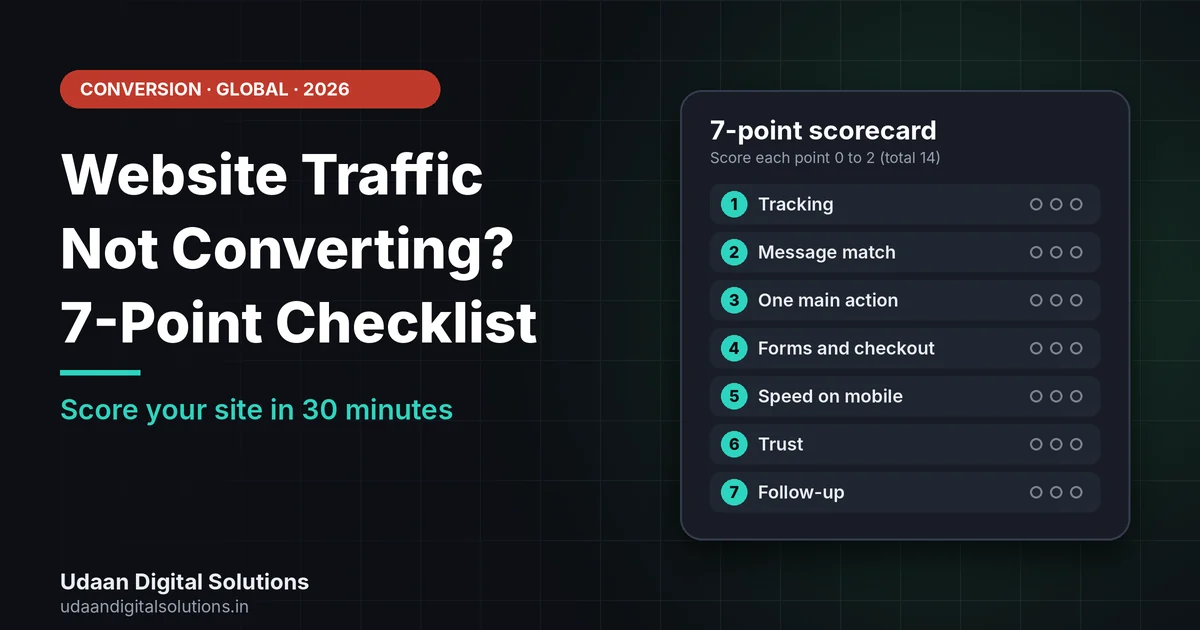
When website traffic is not converting, the cause is usually unclear tracking, a page that does not match the search, no single clear action, friction in forms or checkout, slow mobile pages, weak trust or slow follow-up. Score your site from 0 to 14 on these seven points and fix the lowest first.
Visitors are arriving, but few enquire, book or buy. If you have website traffic not converting, adding more traffic will not help until you know where the leak is. This checklist gives you seven points to score in about thirty minutes, using free tools and published guidance, for businesses in the USA, UK, Australia, Canada, the UAE and beyond.
Why is your website traffic not converting?
Website traffic is not converting when visitors arrive but do not complete the action you want, such as submitting a form, booking a call or buying. A conversion problem is not always a design problem. It can come from the wrong traffic, an unclear page, friction, distrust, slow speed or missing tracking.
With website traffic not converting, the fastest way to find the cause is to look at the page from the visitor’s side. The seven points below follow the visitor’s path: can you measure them, do they land on the right page, do they know what to do, is it easy, is it fast, do they trust you, and do you reply.
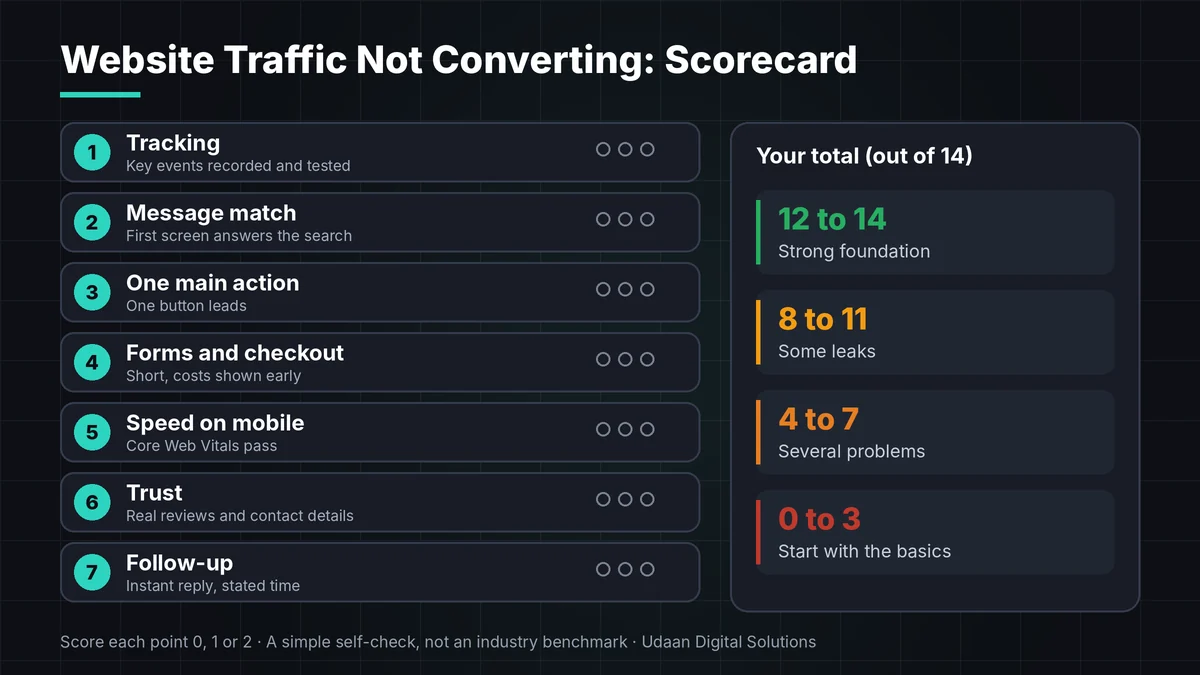
The 7-point checklist for website traffic not converting
Score each point 0, 1 or 2 using the guide under it, and keep a note of every point where website traffic not converting shows up. Be strict: if you have not tested it, score it 0.
Tracking: can you see what counts?
With website traffic not converting, start here. Mark the actions that matter, such as a form submit, a booking or a purchase, as key events in Google Analytics, which uses key events to measure the actions most important to your business. Then test them yourself. If tracking is wrong, every other number you read is wrong too.
Message match: does the page answer the search?
People arrive with a question, and website traffic not converting often starts when the page ignores it. If your page does not answer it in the first screen, they leave. Use the Search Console performance report to see the queries that bring visitors to each page, and compare them with the headline and first paragraph.
One primary action per page
A page with five equal buttons has no main action, a common reason for website traffic not converting. Pick one primary action, such as Book a call, Get a quote or Buy now, and make it the most visible thing. Secondary links can stay, but quieter.
Friction: forms and checkout
Every extra step costs conversions and adds to website traffic not converting. Baymard Institute’s survey lists forced account creation (18%), a long or complicated checkout (17%), no way to see the total cost up front (12%) and too few payment methods (9%) among the reasons people abandon carts. For lead forms, ask only what you need to reply.
Want a second pair of eyes on your site?
Udaan Digital Solutions, an agency in Greater Noida, India, can review your site against this checklist and send a short written audit. We work with small businesses in India and abroad.
Request a Free Audit Working with us from abroad →Speed and mobile
Google’s Core Web Vitals targets are Largest Contentful Paint of 2.5 seconds or less, Interaction to Next Paint of 200 milliseconds or less and Cumulative Layout Shift of 0.1 or less, measured at the 75th percentile. A page that misses them can feel slow or jumpy, especially on a phone.
Trust: do strangers believe you?
Weak trust is a quiet cause of website traffic not converting. New visitors look for signs you are real: reviews, a physical or registered address, named people, clear pricing or terms, and a privacy notice. Baymard’s survey found that 19% of US shoppers abandoned a cart because they did not trust the site with their card details. Do not invent proof; show only what you have.
Follow-up: how fast do you reply?
A form that sends nothing back feels broken and leaves website traffic not converting. Send an immediate confirmation, give a clear reply time and, if you serve several time zones, offer a booking link that shows the visitor’s local time. A fast, clear reply often matters as much as the page itself.
What your score means
Add up your seven scores for a total out of 14 to see how serious your website traffic not converting problem is. This is a simple self-check, not an industry benchmark, so use it to decide what to fix first.
| Total score | What it means | What to do next |
|---|---|---|
| 12 to 14 | Strong foundation | Test one improvement at a time, such as the headline or the button text. |
| 8 to 11 | Some leaks | Fix your lowest-scoring points first, starting with tracking and the main call to action. |
| 4 to 7 | Several problems | Pause new traffic spend, and work through points 1 to 4 on your top page. |
| 0 to 3 | Start over on the basics | Set up tracking, write one clear offer and add a working contact method before anything else. |
A 30-minute diagnosis for website traffic not converting
Use this quick routine for website traffic not converting on your top page. First, open Search Console and note the top three queries for that page. Second, open Analytics and check whether your key events are recording. Third, watch about ten session recordings in a behaviour tool such as Microsoft Clarity, which offers recordings and heatmaps showing where people click, scroll and drop off.
Write down what you see: where do people stop, what do they tap that is not a link, and what do they ignore? Then change the one thing that most clearly blocks the primary action. If you have not set up Search Console, follow our Google Search Console setup guide, and for speed see how to improve Core Web Vitals on WordPress.
If your website traffic is not converting across countries
Visitors from different countries expect different things, so website traffic not converting in one market may convert well in another. and a page built for one market can fail in another. Show prices in the currency your buyers use, state delivery or service areas clearly, and offer payment methods people in that market trust. Baymard’s survey lists too few payment methods as a reason for 9% of US cart abandonment, so this is worth checking.
Privacy rules also vary. In the UK, the Information Commissioner’s Office publishes guidance on cookies and similar technologies, covering consent and exceptions, and its guidance was last updated on 29 April 2026. Check the rules where your visitors live and take advice where needed, because this article is not legal advice. If you work with an agency in another time zone, agree reply times and a shared booking link before you start.
Common mistakes when website traffic is not converting
Redesigning before diagnosing
A new look does not fix a tracking error, a missing price or a form that does not send. Redesigns also reset what you know about the old page.
Reading averages instead of pages
A site-wide conversion rate hides that one page may be converting well and another may be losing everyone.
Ignoring where traffic comes from
Visitors from a broad blog post and visitors from a “get a quote” search behave very differently, and the page should match each.
Testing with too little traffic
On a low-traffic site, a two-day test can show a difference that is only chance.
Final checklist: website traffic not converting
Print this website traffic not converting list and tick it with your team before you spend more on traffic.
- Key events: Your form, call, booking or purchase is tracked and tested.
- Queries: You know the top query for each important page.
- Headline: The first screen answers that query.
- Action: One primary button is the most visible element.
- Form: Only the fields you need to reply.
- Costs: Total price, delivery and fees are shown early.
- Mobile: Key pages pass Core Web Vitals on a phone.
- Trust: Reviews, contact details and a privacy notice are visible.
- Reply: Instant confirmation and a stated reply time.
If you are also deciding where to hire help, read our guide to website development cost in India, the USA and the UK, and the India-focused companion post on traffic but zero leads.
Frequently asked questions: website traffic not converting
Why is my website traffic not converting?
With website traffic not converting, the cause is usually that visitors cannot see the next step, the page does not match what they searched for, or something creates friction or doubt, such as a long form, hidden costs or missing trust signals. Sometimes the conversions happen but are not tracked, so check your key events before changing the design.
What is a good website conversion rate?
There is no single good rate, because it depends on your industry, price, traffic source and what you count as a conversion. Compare your own rate over time and by page rather than against a headline average. Improve your lowest-performing high-traffic page first, since that is where a small gain matters most.
How do I find out why visitors leave without converting?
For website traffic not converting, combine three views: Search Console to see which queries bring people, Google Analytics to see which pages lose them, and session recordings or heatmaps to see what they do. Watch around ten recordings of your top page and note where visitors scroll, hesitate or leave.
Do hidden costs really hurt conversions?
For online stores, yes. In Baymard Institute's survey of US shoppers, extra costs such as shipping, tax and fees were the most common reason for abandoning a cart, at 40%. Show the total price early, including delivery, so buyers are not surprised at the last step.
Do I need cookie consent to measure conversions?
It depends on your market and your tools. UK guidance from the Information Commissioner's Office covers storage and access technologies, with consent rules and exceptions, and other regions have their own rules. Check the rules where your visitors live, and ask a qualified adviser. This article is not legal advice.
How long should I wait to see results after a change?
Give a single change one to two weeks on a page with steady traffic, and compare the same days of the week. If your traffic is low, wait longer or judge by recordings and test enquiries first. Changing many things at once makes it impossible to know what worked.
Related reading and sources
- Traffic but Zero Leads? 9 Website Fixes That Work
- SEO Outsourcing to India: US Small Business Guide
- Google Analytics Help: About key events
- Baymard Institute: Cart abandonment rate statistics
- ICO: Guidance on the use of storage and access technologies
- Microsoft Clarity documentation
Final verdict
If your website traffic is not converting, score your site from 0 to 14 on seven points: tracking, message match, one primary action, friction, speed and mobile, trust, and follow-up. Fix the lowest score first, change one thing at a time, and give each change one to two weeks. For a written review, contact Udaan Digital Solutions in Greater Noida, India.
Get a written website audit
Send your website address and your main goal, and we will reply with the first fixes we would make.
Contact Udaan Digital Solutions
© 2026 Udaan Digital Solutions · Greater Noida, Uttar Pradesh, India · udaandigitalsolutions.in
Sources were read on 22 October 2026: Google Analytics Help, Baymard Institute (US shopper survey and a 50-study average), Microsoft Clarity documentation and the UK ICO. Core Web Vitals targets are published by Google. The scorecard is a simple self-check created by Udaan Digital Solutions, not an industry benchmark. This is not legal advice. We do not guarantee any conversion rate.